


FRONT · CABIN · REAR
4K 3-Channel Dash Cam
Front 4K + cabin + rear, recorded at the same time
+ $4.99 tracked shipping · US & Canada
Choose your kit
Couldn't load pickup availability
Tracked shipping · $4.99 to the US & Canada Delivery & returns
In the box: the camera, rear camera, GPS mount, 64GB card, cables and a trim tool.
- 64GB card included
- Free phone app
- Plugs into your car’s 12V socket
- Questions? Contact us

4K 3-Channel Dash Cam



The problem
It takes 3 seconds. Then it’s your word against theirs.
- Someone runs a red light.
- Someone backs into you and drives off.
- A passenger says something happened that didn’t.
You know what you saw. Nobody else does. And “it wasn’t my fault” doesn’t fix a dented door.
The easy fix
Three cameras. One small unit behind your mirror.
It films the road ahead, the inside of the car and the road behind you, all at the same time, every time you drive.

Illustration of the 3 views on one screen.
- 4KFront camera, 150° view
- 1080P + IRCabin camera that sees at night
- 1080PRear camera, 155° view
- GPSSpeed and location on your clips
How it works
Set it up once. Then just drive.
 01
01Stick it behind your mirror
Clean the glass and press the GPS mount on. The screen faces you. The 4K lens faces the road.
 02
02Add the rear camera
Stick it at the top of your rear window. Tuck the cable under the roof lining. The trim tool and clips are in the box.
 03
03Plug in and drive
Plug it into your car’s 12V socket. It records on a loop while you drive.

Illustration of the infrared cabin view at night.
Inside the car
It sees inside the car too. Even at night.
4 small infrared lights sit around the cabin lens. In daylight you get color. At night you get a clear black-and-white picture of the inside of the car.
- If something happens in the car, there’s video of it.
- You can turn the cabin camera off.
- You can turn sound recording off.
What it keeps
Your clips show when, where and how fast.
Example of the stamp: date, time, location and speed.
GPS in the mount
When the GPS has a signal, your clips show the date, time, speed and location.
Records on a loop
When the card is full, it records over the oldest unlocked clips. Locked clips stay until you delete them.
Locks the clip that matters
Hit something hard? The G-sensor locks that clip so the loop doesn’t record over it.

On your phone
Get the clip on your phone, right there in the car.
Built-in 5GHz Wi-Fi. Open the free app, connect to the camera, then watch, save or share your clips.
Your phone connects to the camera when you’re near the car. There’s no cloud and no live view from home.

When you’re parked
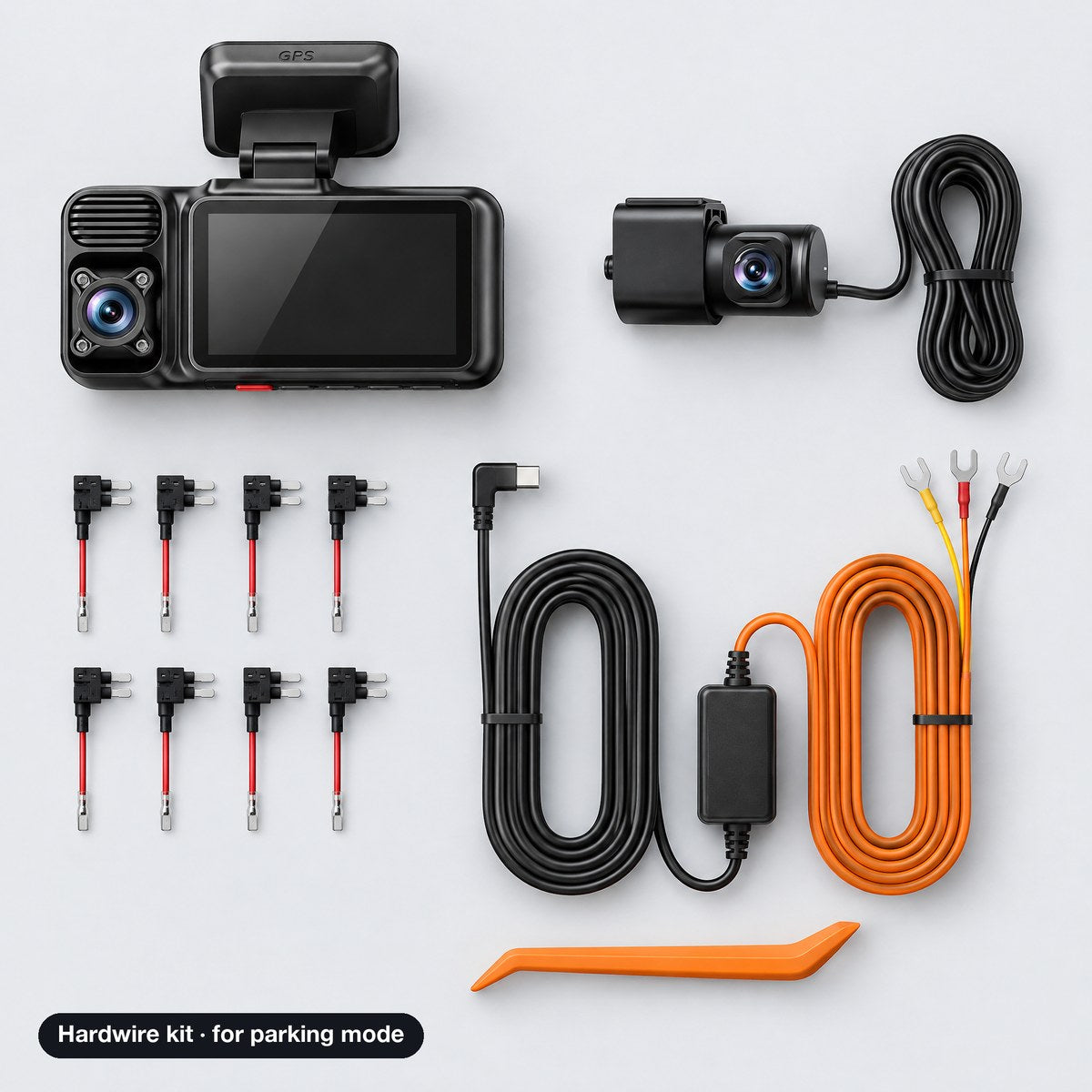
Parked? Add the hardwire kit.
With the 12V plug, it records while you drive. To keep an eye on the car while it’s parked, it needs the hardwire kit. The kit connects to your fuse box and turns on parking mode: time-lapse, or recording when the car gets bumped.
The hardwire kit is not in the basic ‘Dash cam’ option.

In the box
Everything you need to start. Card included.
- 14K dash cam (front + cabin lenses, screen)
- 2GPS windshield mount
- 31080P rear camera
- 4Type-C power cable with 12V car plug
- 5Rear camera cable
- 664GB memory card
- 7Trim tool for hiding cables
- 8Adhesive pads
- 95 cable clips
- 10User manual
Hardwire kit only in the ‘Dash cam + Hardwire kit’ option.
Who it’s for
For anyone who drives a lot.

Daily drivers
For the day someone cuts you off, taps your bumper or runs a light.
Rideshare & delivery
Records the road and the cabin, day and night.
New drivers
For your teen’s first car: video of what really happened.
Road trips with friends
The cabin cam catches the fun parts too.
Good to know
A witness, not a guarantee.
It records what happens. It can’t stop an accident, and it can’t promise how a claim turns out. What it gives you is the video.
- No live view from home and no cloud. Wi-Fi works when you’re near the car.
- Parking mode needs the hardwire kit.
- At night, the cabin view is black and white (infrared).
- The 64GB card holds about 3 hours of driving before it records over the oldest clips (maker’s chart). A bigger card keeps more.
- Rules on recording passengers and sound change by state and province. You can turn the cabin camera and the sound off.
The details
Specs
- Cameras
- 3, recording at the same time
- Front
- 4K (2160P), 150° view, F1.55, WDR
- Cabin
- 1080P, 160° view, F1.8, 4 IR lights, WDR
- Rear
- 1080P, 155° view, F2.0, HDR, mirror and vertical flip
- Night (cabin)
- Infrared, black and white
- Screen
- 3-inch, split view
- Wi-Fi
- 5GHz built-in, free phone app
- GPS
- Built into the mount: speed and location
- Storage
- 64GB microSD card included
- Recording
- Loop recording, G-sensor clip lock
- Parking mode
- Time-lapse or bump detection (hardwire kit required)
- Power
- Type-C cable + 12V car plug; super capacitor, no battery
- Temperature
- -4°F to 158°F (maker’s rating)
- Bluetooth
- No
- Size
- 1.97 x 3.94 x 2.36 in
- Weight
- 5.6 oz
FAQ
Questions drivers ask
Does it record when the car is off?
Only with the hardwire kit. With the 12V plug it records while you drive. With the kit it has parking mode: time-lapse, or recording when the car gets bumped.
Can I just plug it into the 12V socket?
Yes. The 12V plug is in the box and works for driving. You only need the hardwire kit for parking mode.
How do I get the videos on my phone?
Open the free app near the car and connect to the camera’s 5GHz Wi-Fi. Then watch, save or share your clips.
Can I watch it live from home?
No. It has no cellular connection and no cloud. Your phone connects to it when you’re near the car.
How long does the 64GB card last?
About 3 hours of driving with all 3 cameras (maker’s chart). When it’s full, it records over the oldest clips. Clips locked by a bump are kept. Format the card in the camera before first use.
Does the cabin camera see at night?
Yes. 4 infrared lights light up the inside of the car. At night the cabin picture is black and white. In daylight it’s in color.
Can I turn off the inside camera or the sound?
Yes, both can be turned off in the settings. Rules on recording passengers and sound are different from state to state and province to province, so check yours.
Does it show my speed and location?
Yes, when the GPS has a signal. The GPS is in the mount, and your clips show the speed and location. In a garage or a tunnel there may be no signal.
Will the mount stay on?
Clean and dry the glass first, then press the mount on firmly. Adhesive pads are in the box.
How does it handle heat and cold?
It runs on a super capacitor, not a battery. The maker rates it from -4°F to 158°F (-20°C to 70°C). Colder than -4°F is outside that rating.
Will the rear cable reach in my SUV or truck?
The rear cable runs from the windshield along the roof lining to the top of the rear window. Driving a long truck or van? Contact us before you order and we’ll check it for you.
What does shipping cost, and how fast is it?
$4.99 to the US and Canada, with tracking. Orders are usually dispatched within 5 to 8 business days. Delivery time after that depends on your address and the carrier. Your tracking details show on your order status page (link in your confirmation email) as soon as your order ships.
Can I return it?
Message us from our Contact page with your order number to start a return. The item must be unused, in the condition you received it, in its original box, with proof of purchase. Return shipping is paid by the customer. If it arrives damaged or defective, send us your order number and a photo: damaged or defective items are replaced.

Front · Cabin · Rear
Next time, you’ll have the video.
Front 4K + cabin + rear. 64GB card in the box.
$4.99 shipping · US & Canada